Schedulaa
Schedulaa
  • FeaturesSee the full operating system for bookings, workforce, payroll, websites, and payments.WorkforceManage shifts, attendance, time-off, and team operations from one system.BookingAppointments, packages, availability, and checkout flows that stay on brand.MarketingPublish content, capture leads, and turn pages into conversion surfaces.CommerceSell physical or digital goods with inventory, categories, and shipping support.PayrollPreview, finalize, export, and audit payroll without leaving operations.Website BuilderLaunch branded websites and embedded booking flows without plugins.Business FinanceRun quote-to-work execution with estimates, payment links, field reports, and month-end visibility.Invoices & EstimatesCreate estimates, convert them to invoices, send payment links, and track cash, e-transfer, or card payments.Mobile AppDownload the Android app and see manager and employee workflows built for daily operations.
    View all product surfaces
  • IndustriesBrowse industry-specific workflows and deployment patterns.Demo / Test DriveWalk through the product with scheduling, workforce, and payroll in one view.ContactTalk to the team about rollout, migration, or enterprise questions.BlogRead product launches, operator guides, and workflow breakdowns.DocumentationImplementation guides, setup notes, and technical documentation.Zapier automationConnect booking and payroll events to the rest of your workflow stack.QuickBooks onboardingReview native accounting export setup for QuickBooks.Xero onboardingSee journal export and mapping guidance for Xero deployments.FAQGet quick answers about setup, pricing, and platform behavior.Help CenterGo to support and client help resources.
    View all resources
  • Pricing
Employee DashboardManager Dashboard

Choose language

Pick your preferred language for the marketing site.

LoginStart free
Employee DashboardManager DashboardLoginStart free
FeaturesWorkforceBookingMarketingCommercePayrollWebsite BuilderBusiness FinanceInvoices & EstimatesMobile AppPricingIndustriesDemo / Test DriveContactBlogDocumentationZapier automationQuickBooks onboardingXero onboardingFAQHelp Center

Book demo

Book directly without leaving the marketing site.

Open full page
Business Finance

Estimates, invoices, and payment links for service businesses

Create professional estimates, convert approved work into invoices, send payment links, and track payments without jumping between spreadsheets, PDFs, and payment tools.

Start freeSee Business Finance

Workflow focus

Quote to payment

BF
Estimate-first billing flow
Hosted and manual payments
Repeat invoice reuse
Built for service businesses that need approvals, payment links, offline collection, and finance-ready month-end review in one record path.
The billing mess

Too many service businesses still bill from text messages, memory, and copied PDFs

Schedulaa is built for teams that need a clean quote-to-invoice flow without rebuilding the same billing record every week.

1

Prices get sent by text, WhatsApp, DM, or email, then someone recreates them later in an invoice.

2

Payment status lives in too many places, so managers do not know what is paid, pending, or disputed.

3

Cash, cheque, e-transfer, and external card terminal payments get accepted in real life, but never stay connected to the invoice record.

4

Repeat clients force teams to retype billing contacts, addresses, and job details again and again.

5

Month-end review turns into a cleanup project because estimates, invoices, and payments are scattered.

Quote-to-invoice workflow

Move from estimate to paid invoice without breaking context

The workflow is designed for service businesses that need approvals, invoices, payment links, offline payments, and month-end visibility in one operational path.

1
Workflow step

Quote request

Progress the record forward without rebuilding the billing context.
2
Workflow step

Estimate

Progress the record forward without rebuilding the billing context.
3
Workflow step

Approval

Progress the record forward without rebuilding the billing context.
4
Workflow step

Invoice

Progress the record forward without rebuilding the billing context.
5
Workflow step

Payment link

Progress the record forward without rebuilding the billing context.
6
Workflow step

Manual or online payment tracking

Progress the record forward without rebuilding the billing context.
7
Workflow step

Month-end review

Close the billing cycle with clean reporting and payment visibility.
What the page covers

Billing tools built for real service workflows

This page reflects the Business Finance billing workflow already available inside Schedulaa for estimates, invoices, payment tracking, and repeat billing operations.

Billing capability

Estimate builder

Create client-ready estimates before any invoice exists, then revise or resend them when scope changes.

Billing capability

Convert estimate to invoice

Turn approved work into an invoice without copying line items into a second document.

Billing capability

Professional invoice detail

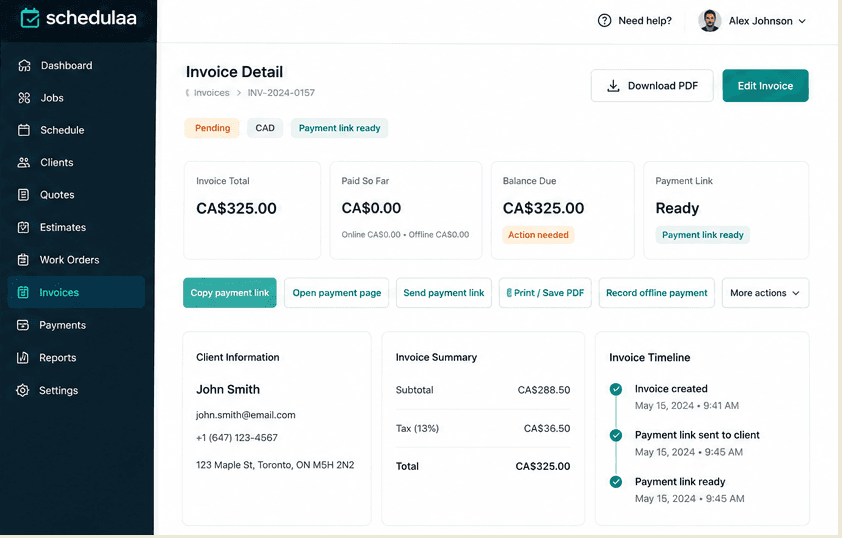
Keep invoice number, issue date, due date, notes, terms, tax totals, and line items in one structured record.

Billing capability

Payment instructions

Add billing notes and payment instructions so the invoice explains how the client should pay.

Billing capability

Hosted payment links

Send invoice payment links when you want clients to pay online while keeping invoice status tied to that payment flow.

Billing capability

Offline payment recording

Record cash, e-transfer, cheque, bank transfer, or external terminal payments without pretending every payment must happen inside the app.

Billing capability

Refund tracking

Track invoice refunds separately from the original billing record so finance reviews stay clean.

Billing capability

Create similar invoice

Reuse a prior invoice structure for repeat work instead of rebuilding the same service billing layout every time.

Billing capability

Tax-aware totals

Keep service billing tax-aware so totals, labels, and reporting stay more organized for review.

Billing capability

Billing recipient and client reuse

Reuse existing client and billing information so repeat invoices start from real saved data, not blank fields.

Manual payments still belong in the record

Card payments are optional. Billing organization is not.

Schedulaa supports payment links when you want online collection, but it also respects how service businesses actually get paid in the field and at the counter.

Businesses can still accept cash, cheque, e-transfer, bank transfer, or external card terminal payments and record them manually in Schedulaa.

Who this is for

Made for service businesses that bill real work, not just generic line items

The invoice and estimate workflow fits teams that need fast quoting, repeat billing, payment follow-up, and cleaner month-end handoffs.

Best fit

Home and field services

Cleaning companies, repair services, installers, and mobile teams that quote custom jobs and need repeat billing.

Best fit

Beauty and appointment-led teams

Studios, salons, mobile beauty teams, and wellness operators that need estimates, invoices, and payment instructions for custom work.

Best fit

Contractors and local operators

Contractors and local service providers that send proposals, invoice approved work, and collect payment across multiple methods.

Best fit

Small agencies and recurring service firms

Creative agencies, local agencies, and recurring service businesses that reuse client billing details and issue repeat invoices often.

Invoice FAQ

Common questions about estimates, invoices, and payment links

These answers are written for service businesses that need a cleaner quote-to-invoice workflow without moving into accounting-heavy software too early.

Can I create estimates before invoices?

Yes. Schedulaa supports estimates first, then invoices later. That lets you quote the work, wait for approval, and only create the invoice when the job is ready to bill.

Can I send a payment link with an invoice?

Yes. You can attach hosted payment links to invoices so clients can pay online while keeping the payment state visible on the invoice record.

Can I record cash or e-transfer payments?

Yes. Schedulaa is not limited to online card collection. You can record cash, cheque, e-transfer, bank transfer, and external terminal payments manually.

Can I reuse client billing information?

Yes. Existing client and billing details can be reused so repeat invoices start faster and stay more consistent.

Can I create repeat invoices?

Yes. You can create similar invoices from existing records so repeat service work does not require rebuilding the same billing structure from scratch.

Does Schedulaa calculate tax on invoices?

Schedulaa supports tax-aware invoice totals so service businesses can keep billing and reporting more organized. Final tax setup should still follow your accounting guidance.

Ready to clean up billing?

Turn estimates into paid invoices without the weekly admin mess.

Use one workflow for estimates, invoices, payment links, manual payments, and repeat billing instead of rebuilding the same client billing trail every week.

Start freeSee Business Finance
footer gradient
Schedulaa

Schedulaa is the operating system for service businesses: scheduling, payroll, and website booking in one platform.

Company

  • Contact
  • Status
  • Roadmap
  • Privacy
  • Refund policy
  • Terms
  • Account deletion
  • Log in
  • Get started

Product

  • Features
  • Workforce
  • Booking
  • Industries
  • Marketing
  • Commerce
  • Payroll
  • Website Builder
  • Business Finance
  • Mobile App
  • Pricing

Resources

  • Blog
  • Demo / Test Drive
  • Contact
  • Docs
  • Help Center
  • Zapier automation
  • QuickBooks onboarding
  • Xero onboarding

Compare

  • Compare hub
  • Alternatives hub
  • Schedulaa vs Vagaro
  • Schedulaa vs QuickBooks
  • Schedulaa vs QuickBooks Payroll
  • Schedulaa vs Humi
  • Schedulaa vs Square Appointments
  • Schedulaa vs Xero
  • Schedulaa vs Deputy
  • Schedulaa vs Homebase
  • Schedulaa vs When I Work
  • Schedulaa vs Acuity Scheduling
  • Schedulaa vs Gusto
  • Schedulaa vs ADP
  • Schedulaa vs Paychex
  • View all comparisons

© 2026 Schedulaa. All rights reserved.