
Schedulaa
Schedulaa
  • Creador de sitios webLaunch branded websites and embedded booking flows without plugins.ReservasAppointments, packages, availability, and checkout flows that stay on brand.Facturas y presupuestosCreate estimates, convert them to invoices, send payment links, and track cash, e-transfer, or card payments.PersonalManage shifts, attendance, time-off, and team operations from one system.ComercioSell physical or digital goods with inventory, categories, and shipping support.FuncionesSee the full platform for websites, bookings, invoices, payments, staffing, and service operations.MarketingPublish content, capture leads, and turn pages into conversion surfaces.Finanzas empresarialesRun quote-to-work execution with estimates, payment links, field reports, and month-end visibility.NóminaReview payroll as a supporting back-office workflow connected to service operations.App móvilDownload the Android app and see manager and employee workflows built for daily operations.
    View all product surfaces
  • IndustriasBrowse industry-specific workflows and deployment patterns.Demo / PruebaWalk through websites, bookings, invoices, payments, and scheduling in one product view.ContactoTalk to the team about rollout, migration, or enterprise questions.BlogRead product launches, operator guides, and workflow breakdowns.DocumentaciónImplementation guides, setup notes, and technical documentation.Automatización de ZapierConnect booking, scheduling, invoice, and payment events to the rest of your workflow stack.Integración con QuickBooksReview native accounting export setup for QuickBooks.Integración con XeroSee journal export and mapping guidance for Xero deployments.Preguntas frecuentesGet quick answers about setup, pricing, and platform behavior.Centro de ayudaGo to support and client help resources.
    View all resources
  • Precios
Panel de empleadoPanel de gerente

Choose language

Pick your preferred language for the marketing site.

Iniciar sesiónComenzar gratis
Panel de empleadoPanel de gerenteIniciar sesiónComenzar gratis
Creador de sitios webReservasFacturas y presupuestosPersonalComercioFuncionesMarketingFinanzas empresarialesNóminaApp móvilPreciosIndustriasDemo / PruebaContactoBlogDocumentaciónAutomatización de ZapierIntegración con QuickBooksIntegración con XeroPreguntas frecuentesCentro de ayuda

Reservar demo

Book directly without leaving the marketing site.

Open full page
Business Finance

Estimates, invoices, and payment links for service businesses

Create professional estimates, convert approved work into invoices, send payment links, and track payments without jumping between spreadsheets, PDFs, and payment tools.

Estimate to invoice
Repeat billing
Month-end review
Start freeSee Business Finance
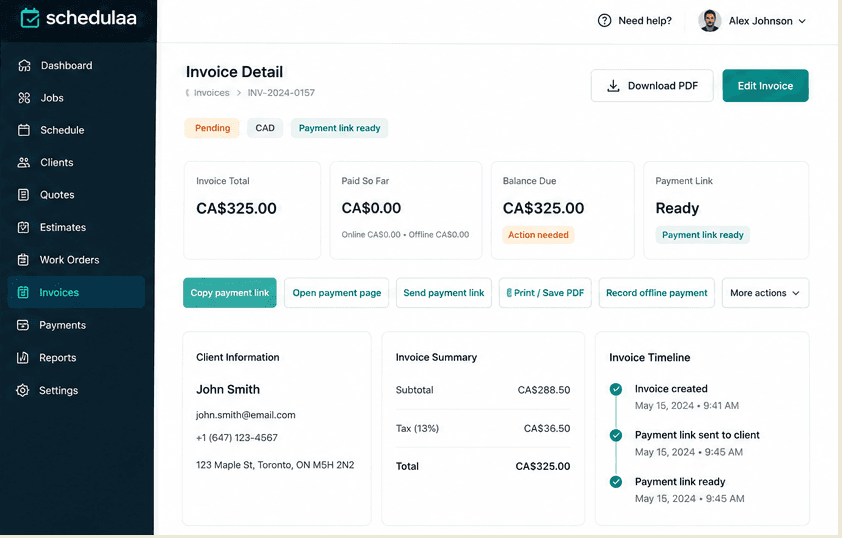
Schedulaa invoice detail and payment link workflow
Built for service teams that need approvals, payment links, offline collection, and cleaner month-end review in one record path.
Quote-to-invoice workflow

Move from estimate to paid invoice without breaking context

Keep approval, invoicing, collections, and review on one operating path.

1.Quote request
2.Estimate
3.Approval
4.Invoice
5.Payment link
6.Manual or online payment tracking
7.Month-end review
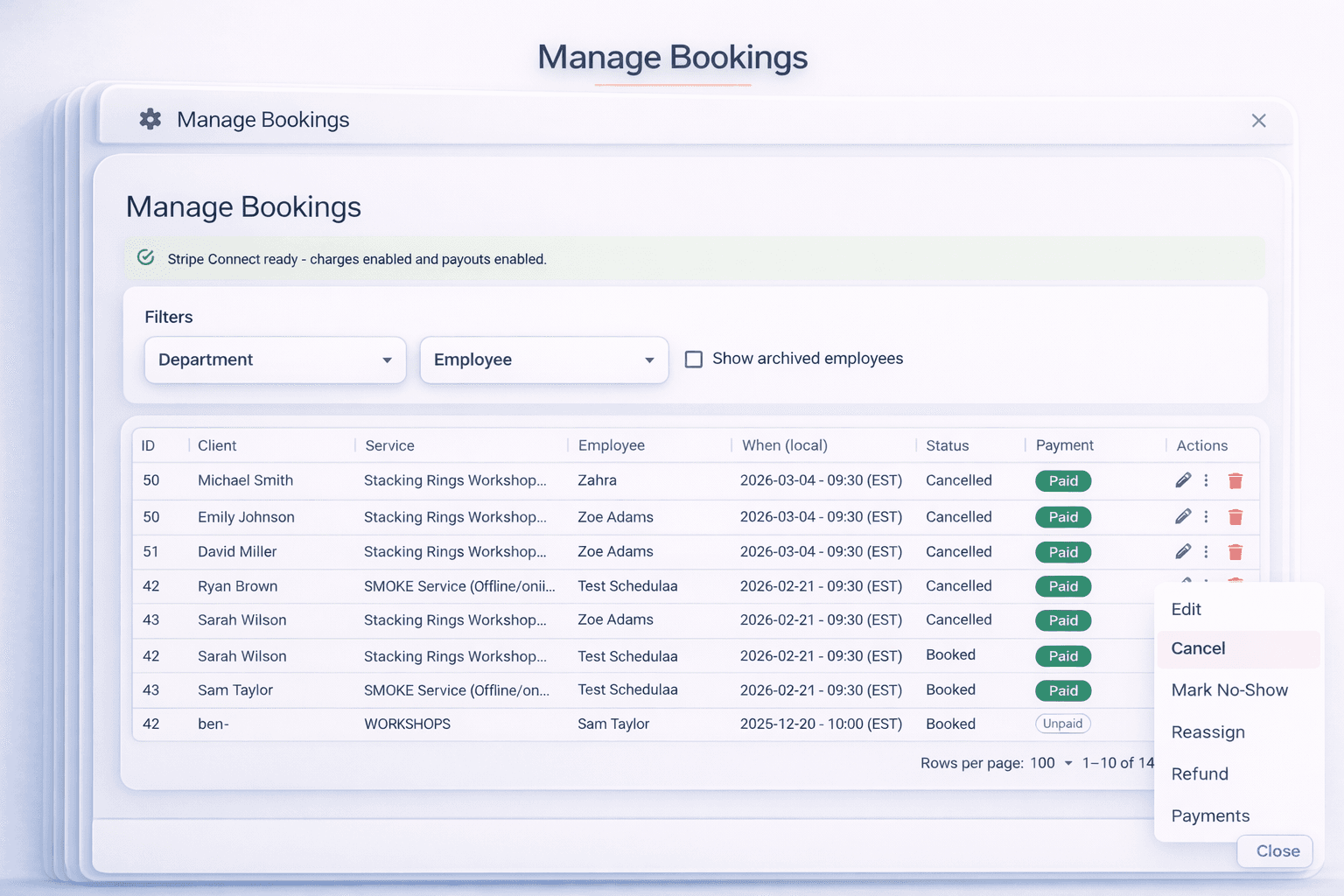
Schedulaa payment collection workflow
The billing mess

Billing still breaks when the job and the invoice live in separate places.

Schedulaa keeps quoting, payment status, and recorded collections on one billing path.

1

Quoted prices get recreated later in the invoice.

2

Managers lose track of what is paid, pending, or disputed.

3

Offline payments happen, but the invoice record falls behind.

4

Repeat clients force teams to retype billing contacts, addresses, and job details again and again.

5

Month-end review turns into a cleanup project because estimates, invoices, and payments are scattered.

What the page covers

Billing tools tied to the real job

Quoting, invoicing, and billing follow-through stay on one record.

Billing capability

Estimate builder

Create, revise, and resend client-ready estimates.

Billing capability

Convert estimate to invoice

Turn approved work into an invoice without copying it twice.

Billing capability

Professional invoice detail

Keep invoice totals, terms, notes, and tax in one record.

Billing capability

Payment instructions

Add simple billing notes and payment instructions.

Billing capability

Hosted payment links

Send online payment links with status tied to the invoice.

Billing capability

Offline payment recording

Record cash, e-transfer, cheque, bank transfer, or terminal payments.

Billing capability

Refund tracking

Track invoice refunds separately from the original billing record so finance reviews stay clean.

Billing capability

Create similar invoice

Reuse a prior invoice structure for repeat work instead of rebuilding the same service billing layout every time.

Billing capability

Tax-aware totals

Keep service billing tax-aware so totals, labels, and reporting stay more organized for review.

Billing capability

Billing recipient and client reuse

Reuse existing client and billing information so repeat invoices start from real saved data, not blank fields.

Who this is for

Built for service teams billing real work

Best for teams that need faster quoting and cleaner billing follow-through.

Best fit

Home and field services

Cleaning, repair, installation, and mobile teams quoting custom jobs.

Best fit

Beauty and appointment-led teams

Studios, salons, and wellness teams billing custom or approved work.

Best fit

Contractors and local operators

Contractors sending proposals, invoices, and collecting mixed payment types.

Invoice FAQ

Common questions about invoice workflow

Short answers for service teams evaluating estimate and invoice workflow.

Can I create estimates before invoices?

Yes. Start with an estimate, wait for approval, then invoice when the job is ready.

Can I send a payment link with an invoice?

Yes. Payment links can be attached while keeping status visible on the invoice.

Can I record cash or e-transfer payments?

Yes. Cash, cheque, e-transfer, bank transfer, and terminal payments can be recorded manually.

Can I reuse client billing information?

Yes. Existing client and billing details can be reused for repeat invoices.

Can I create repeat invoices?

Yes. Similar invoices can be created from existing records.

Does Schedulaa calculate tax on invoices?

Schedulaa supports tax-aware totals. Final tax setup should still follow your accounting guidance.

Ready to clean up billing?

Turn estimates into paid invoices without the weekly admin mess.

Use one workflow for estimates, invoices, collections, and repeat billing.

Start freeSee Business Finance
footer gradient
Schedulaa

Schedulaa es el sistema operativo para negocios de servicios: programación, nómina y reservas web en una sola plataforma.

Empresa

  • Contacto
  • Estado
  • Hoja de ruta
  • Privacidad
  • Política de reembolso
  • Términos
  • Account deletion
  • Iniciar sesión
  • Comenzar

Producto

  • Funciones
  • Personal
  • Reservas
  • Industrias
  • Marketing
  • Comercio
  • Nómina
  • Creador de sitios web
  • Finanzas empresariales
  • App móvil
  • Precios

Recursos

  • Blog
  • Demo / Prueba
  • Contacto
  • Documentos
  • Centro de ayuda
  • Automatización de Zapier
  • Integración con QuickBooks
  • Integración con Xero

Comparar

  • Centro de comparación
  • Centro de alternativas
  • Schedulaa vs Vagaro
  • Schedulaa vs QuickBooks
  • Schedulaa vs QuickBooks Payroll
  • Schedulaa vs Humi
  • Schedulaa vs Square Appointments
  • Schedulaa vs Xero
  • Schedulaa vs Deputy
  • Schedulaa vs Homebase
  • Schedulaa vs When I Work
  • Schedulaa vs Acuity Scheduling
  • Schedulaa vs Gusto
  • Schedulaa vs ADP
  • Schedulaa vs Paychex
  • View all comparisons

© 2026 Schedulaa. Todos los derechos reservados.